> For the complete documentation index, see [llms.txt](https://docs.voiceb.ai/llms.txt). Markdown versions of documentation pages are available by appending `.md` to page URLs; this page is available as [Markdown](https://docs.voiceb.ai/memory-conversation-recall.md).
# Memory - Conversation Recall
By Alex Bisbe. February, 17th 2026.
Persistent commercial continuity — agent by agent.
Memory allows your agent to securely resume conversations exactly where they stopped.
Instead of restarting from zero when a prospect calls again, the agent:
* Recognizes the phone number
* Requests name validation (GDPR compliance)
* Recovers the previous summary
* Continues from the last completed step
This is a structural UX upgrade — not just a feature.
***
## Why Memory Matters (UX & Revenue Impact)
Without Memory:
* Users repeat information
* Agents re-ask already confirmed details
* Momentum is lost
* Sales cycles extend
* Conversion drops
With Memory:
* Context persists
* Conversations feel human
* The commercial journey continues naturally
* Sales cycles shorten
This is especially powerful in:
#### B2B
Where decision cycles span days or weeks.
#### Energy, Telco, Insurance, Financing
Where customers compare before committing.
Memory removes friction and preserves intent.
***
## 🔐 Data Protection & Validation Logic
Memory is secure by design.
If a caller has contacted before, the agent must say:
> “I see that you called before. For data protection reasons, can you confirm your name so we can resume the conversation?”
#### If the name matches:
* The agent greets the caller by name.
* Summarizes the previous conversation.
* Continues exactly where it stopped.
* Avoids repeating confirmed information.
The agent remembers:
* Price discussed
* Tariff selected
* Surname
* Objections
* Last completed step
#### If the name does NOT match:
* The system assumes it is a different person.
* The conversation resets.
* The agent starts almost from zero.
This prevents cross-user data exposure when multiple people share a phone number.
***
## Already a Customer Logic
If after validation previous calls show the user is already a client:
* Redirect to Customer Support for service issues.
* If they want a new contract, resume the commercial process from the last completed step.
***
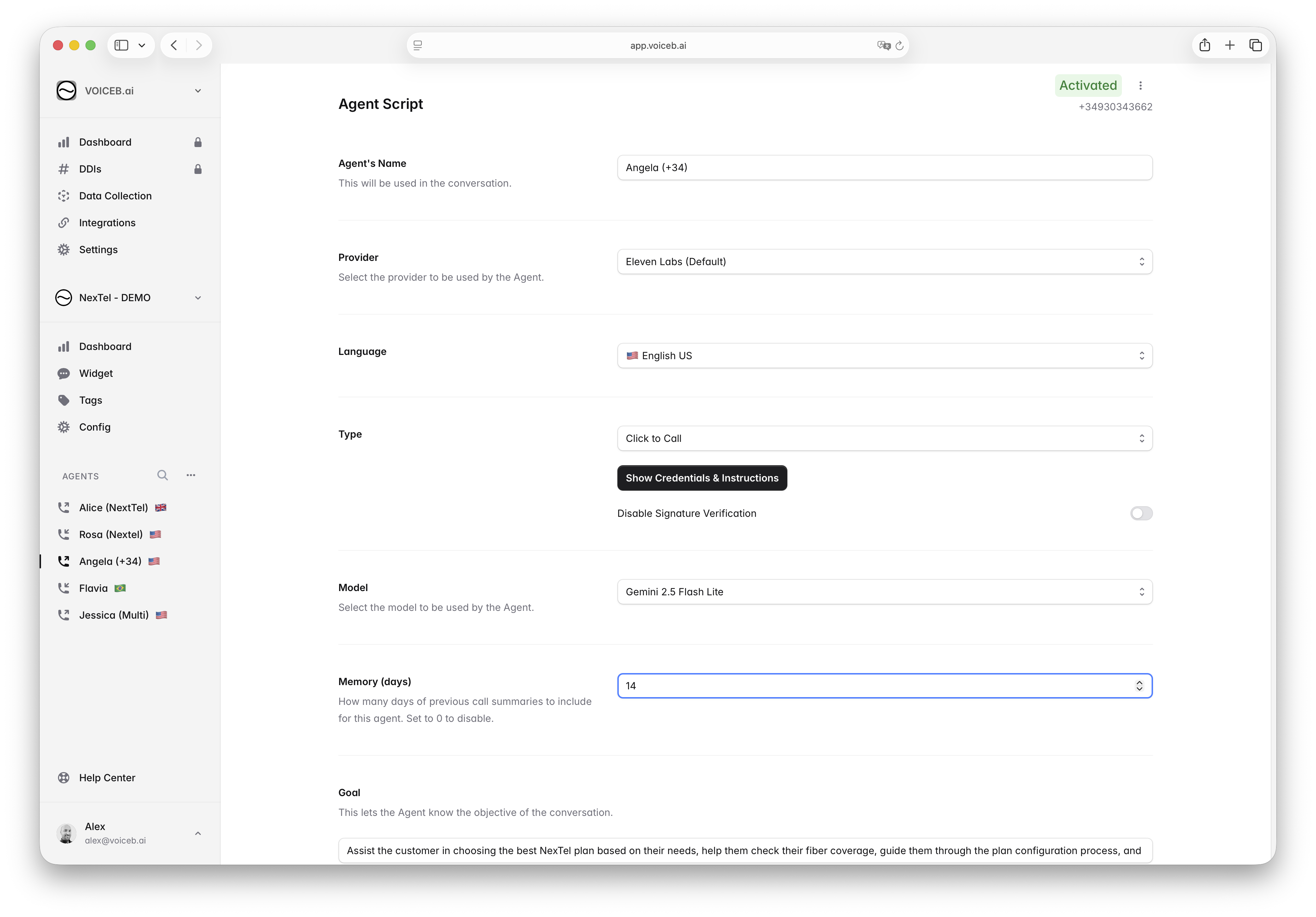
## How to Activate Memory (Agent by Agent)
Memory is configured individually per agent.
To activate:
1. Go to **Agent → Config**
2. Find **Memory (days)**
3. Enter the number of days
4. Click **Save**
If set to:
* `0` → Disabled
* `14` → Remembers last 14 days
* `30` → Remembers last 30 days
Each agent can have a different memory window depending on its objective.
***
## Recommended Memory Windows
Choose the number of days based on your sales cycle.
#### B2B
Recommended: **15 to 90 days**
#### High-consideration B2C
Recommended: **15 to 30 days**
#### Fast-decision B2C
Recommended: **7 to 15 days**
***
### ⚠ Important: Pricing & Promotion Expiry
If:
* Prices change frequently
* Promotions expire quickly
* Conditions vary weekly
Use a shorter Memory window.
The agent will remember previously discussed pricing.\
If pricing has changed, you must either:
* Add prompt logic to revalidate pricing upon resume
* Or reduce the memory window
This is critical for:
* Energy tariffs
* Telecom promotions
* Limited-time offers
***
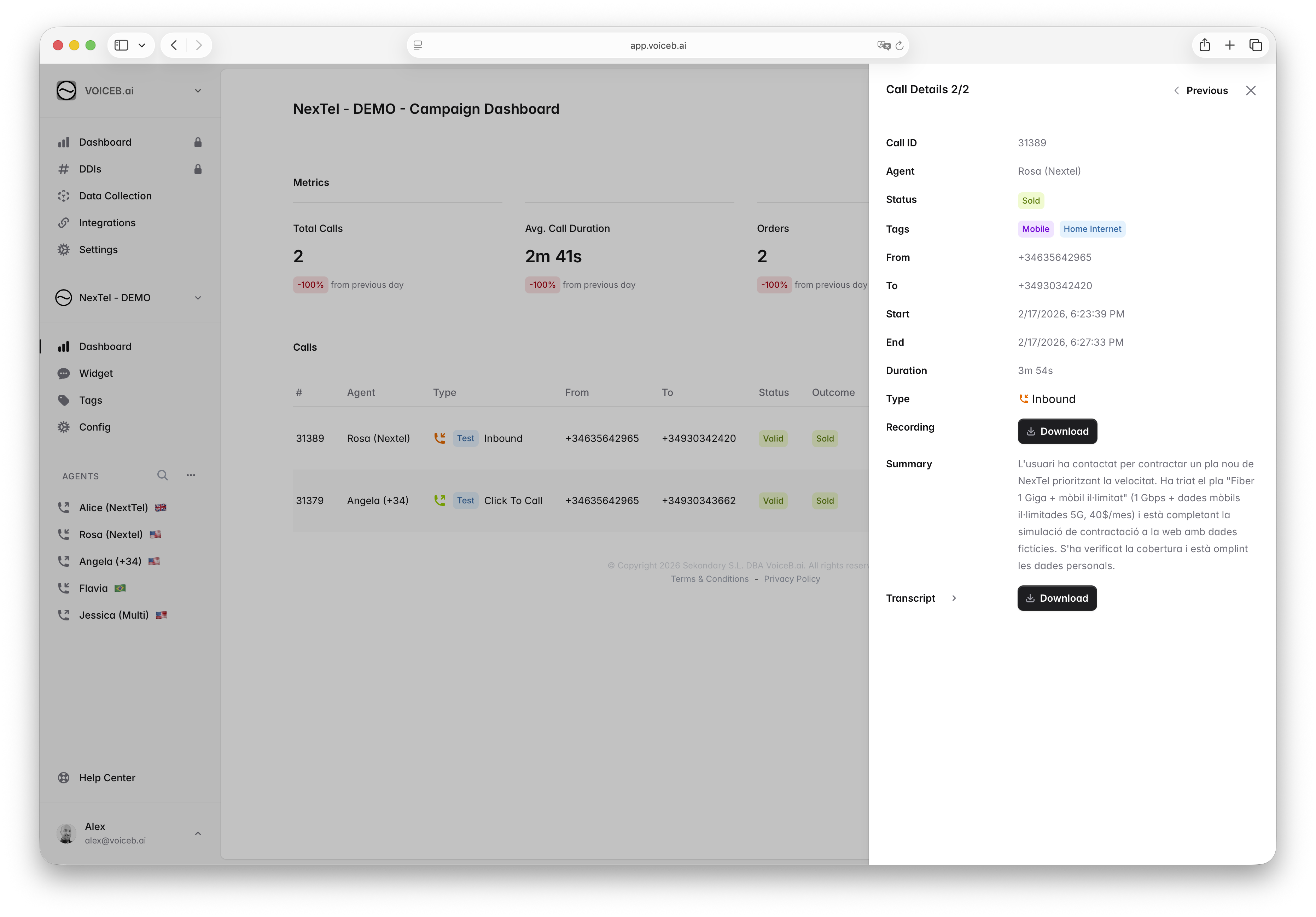
## Dashboard: Viewing Conversation Chains
When the same customer calls multiple times within the memory window, the Dashboard shows:
* **Call Details 1/2**
* **Call Details 2/2**
* Navigation buttons (Next / Previous)
Each call has its own Call ID, but the interface lets you navigate across the conversation chain.
This allows you to:
* Follow the evolution of the sale
* Understand how objections progressed
* See how the deal was closed
* Review summaries incrementally
Memory enhances the live interaction — the dashboard lets you audit the journey.
***
## CRM & Post-Call Data
Memory does NOT merge calls internally.
Each call still generates:
* Transcript
* Summary
* Structured outcomes
* Tags
* Status (Valid, Sold, etc.)
After each call, post-call data is sent automatically:
* To **HubSpot**
* To **Salesforce**
* Or via **Webhook** to any external system
Depending on your integration setup:
* You can create a new Lead
* Update an existing Lead
* Add a Task/Activity per call
Each call remains traceable and independent at CRM level.
Memory affects the conversation experience — not the reporting logic.
***
## Script Requirement for Proper Behavior
You must include Memory-aware logic in your prompt:
```
# PREVIOUS CALL CONTEXT
If the caller has previously contacted us:
Say:
“I see that you called before. For data protection reasons, can you confirm your name so we can resume the conversation?”
If the name matches:
- Greet them by name.
- Summarize previous conversation.
- Continue exactly from the previous step.
- Avoid repeating confirmed information.
If the name does not match:
- Restart the conversation from the beginning.
```
***
## What Makes This Unique
This is not simple context recall.
It required:
* Phone-number-based session linking
* Controlled summary injection
* Name validation gating
* Secure reset logic
* Dashboard navigation support
* CRM-safe post-call isolation
It moves VoiceB from stateless automation to persistent commercial memory.
That shift increases:
* Trust
* Intelligence perception
* Conversion probability
* Sales efficiency
This is foundational infrastructure for autonomous revenue execution.
***
---
# Agent Instructions
This documentation is published with GitBook. GitBook is the documentation platform designed so that both humans and AI agents can read, navigate, and reason over technical content effectively. Learn more at gitbook.com.
## Querying This Documentation
If you need additional information that is not directly available in this page, you can query the documentation dynamically by asking a question.
Perform an HTTP GET request on the current page URL with the `ask` query parameter, and the optional `goal` query parameter:
```
GET https://docs.voiceb.ai/memory-conversation-recall.md?ask=&goal=
```
`ask` is the immediate question: it should be specific, self-contained, and written in natural language.
`goal` is optional and describes the broader end goal you are ultimately trying to accomplish on behalf of the user. GitBook uses it to tailor the answer towards what is most useful for that goal.
The response will contain a direct answer to the question and relevant excerpts and sources from the documentation.
Use this mechanism when the answer is not explicitly present in the current page, you need clarification or additional context, or you want to retrieve related documentation sections.