> For the complete documentation index, see [llms.txt](https://docs.voiceb.ai/llms.txt). Markdown versions of documentation pages are available by appending `.md` to page URLs; this page is available as [Markdown](https://docs.voiceb.ai/tags-custom-ai-classification-for-calls-and-leads.md).
# Tags — Custom AI Classification for Calls & Leads
By Alex Bisbe. Last update: January 26th 2026
Tags turn VoiceB into a **semantic classifier**. The AI understands each call end-to-end and **auto-labels it using your custom tags**. This gives us a **second, fully customizable outcome layer** on top of standard call results. Net effect: cleaner lead qualification, smarter routing, and higher signal pushed to CRM and agents.
***
### What problem Tags solve
Traditional outcomes (Valid, Invalid, Transferred, Dropped, etc.) are necessary but generic. Tags let us **encode business logic**—products, intents, customer type, ambiguity—directly into the call. The AI applies these tags in real time based on what the caller actually says.
**Bottom line:** more precision, less manual work, better decisions downstream.
***
### How Tags work (at a glance)
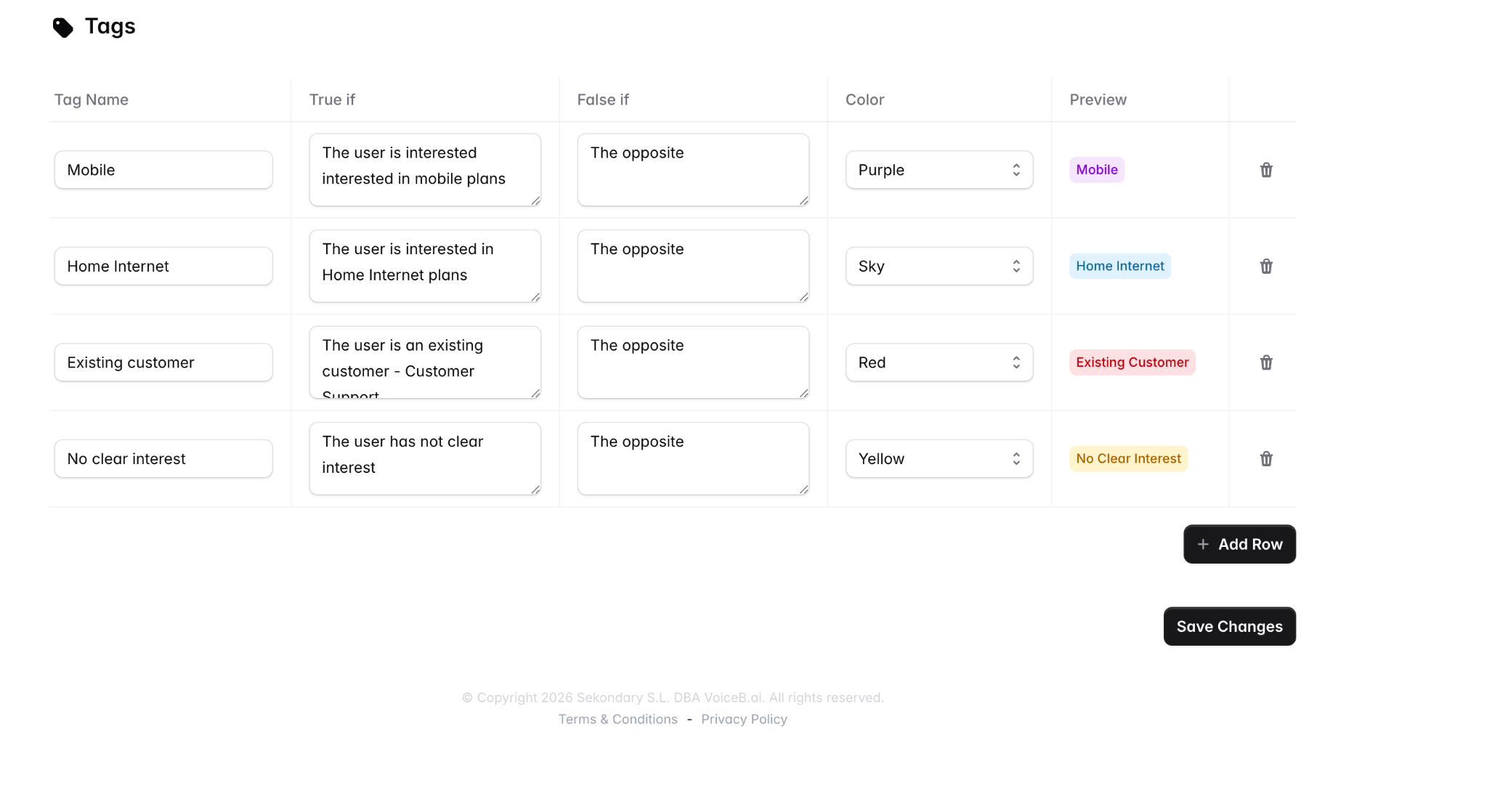
1. **Define tags** (unlimited): name, condition for *true*, condition for *false*, and color.
2. **AI listens to the call** and evaluates intent and context.
3. **Tags are automatically applied** to the call.
4. **Tags appear everywhere**: dashboard, call detail, exports, CRM, routing logic.
Think of Tags as **custom outcomes tailored to your business**.
***
### Common use cases
* **Lead classification**: Mobile, Fiber, Convergent, SME, Enterprise
* **Customer filtering**: Existing customer vs new prospect
* **Intent clarity**: No clear interest, comparison shopping, price-driven
* **Routing**: Send only “Mobile + High Intent” calls to sales
* **CRM enrichment**: Push structured intent data, not raw transcripts
***
### How to create Tags
Go to **Choose Campaign → Tags** and add as many as needed.
For each tag, define:
* **Tag name** (e.g. *Mobile*, *Home Internet*)
* **True if**: when the AI should apply the tag
* **False if**: when it should explicitly not apply
* **Color**: visual clarity in the dashboard
You’re not training a model. You’re **describing intent in plain language**. VoiceB handles the rest.
***
### How Tags appear in the Dashboard
Once enabled, Tags are visible directly in the **Calls table** and **Call detail view**:
* Multiple tags can be applied to a single call
* Tags coexist with standard outcomes (Valid, Invalid, Transferred, etc.)
* Visual color coding makes patterns obvious at scale
This allows instant analysis like:
* *Valid + Mobile + Fiber*
* *Invalid + Customer Care*
* *No Clear Interest + Dropped*
***
### Tags as a “second outcome”
Outcomes answer **what happened**.\
Tags answer **what this call means**.
That’s the key shift.
With Tags:
* Outcomes stay standardized
* Classification becomes **fully custom**
* Routing and CRM logic becomes deterministic
In practice, Tags act as a business-specific outcome layer without breaking reporting or analytics by default — with one exception: a tag can be explicitly configured, in any campaign type, to force a Sold outcome, overriding the Outcome Engine's default classification. Use this only when you intentionally want a tag-based business rule to override the standard result.
***
### CRM & routing integration
Tags can be used to:
* Populate CRM fields automatically
* Trigger routing rules (only transfer if Tag = X)
* Filter reports and exports
* Inform agents before they even pick up the call
This is especially powerful in high-volume inbound environments where **every unnecessary transfer costs money**.
***
### Best practices
* Start with **high-level intent tags** (Product, Customer Type)
* Avoid over-engineering on day one
* Use Tags to **reduce ambiguity**, not describe everything
* Review tag distribution weekly to refine definitions
***
### Why this matters
Tags move VoiceB from call handling to **decision intelligence**.
We’re not just answering calls.\
We’re structuring intent, at scale, automatically.
That’s what unlocks:
* Higher conversion
* Lower operational cost
* Cleaner data
* Fully autonomous inbound sales
If you want to push Tags into routing or CRM logic, that’s already supported.
---
# Agent Instructions
This documentation is published with GitBook. GitBook is the documentation platform designed so that both humans and AI agents can read, navigate, and reason over technical content effectively. Learn more at gitbook.com.
## Querying This Documentation
If you need additional information that is not directly available in this page, you can query the documentation by asking a question.
Perform an HTTP GET request on the following URL with the `ask` and `goal` query parameters:
```
GET https://docs.voiceb.ai/tags-custom-ai-classification-for-calls-and-leads.md?ask=&goal=
```
`ask` is the immediate question: it should be specific, self-contained, and written in natural language.
`goal` is what the user is ultimately trying to achieve, the reason they need the answer. Sharing it helps GitBook give you a better, more relevant answer. A goal is most helpful when it describes the outcome the user wants rather than restating the question. For example, with `ask=how do I create an API token`, a goal like `automate deployments from our CI pipeline` lets GitBook tailor the answer to that use case.
The response will contain a direct answer to the question and relevant excerpts and sources from the documentation.
Use this mechanism when the answer is not explicitly present in the current page, you need clarification or additional context, or you want to retrieve related documentation sections.